CINEMANEXT TEST DCP PACKAGE
At CinemaNext, supporting our exhibitors is our top priority. To help you keep every screen performing at its best, we've developed our own complete Test DCP Package — a set of purpose-made test contents that let you check the full integrity of your digital cinema system, quickly and without specialist equipment.
What Is the CinemaNext Test DCP Package?
The Test DCP Package is a collection of test contents you can play on your digital cinema server to confirm that projection, sound and playback are all working correctly. It's useful whenever you need to verify a system: commissioning a new installation, running routine checks, troubleshooting a fault, or confirming everything is right before opening to the public after a period of closure. While some issues may still need a visit from one of our qualified technicians, this simple, equipment-free procedure confirms your system is functioning as it should, so you can screen with confidence.
What Does the Test DCP Package Check?
The package includes test contents for:
- Server certificate — encrypted content to test your server certificate, including subtitles
- Image calibration — checking projected image alignment and quality
- Sound — 5.1 and 7.1 surround sound checks
- Audio/video synchronisation — confirming sound and picture are aligned
Each test is accompanied by snapshots of the DCP and a technical explanation of what it verifies.
How to Use the Test DCP Package
Below you'll find the complete step-by-step walkthrough (PDF version available HERE) along with the test files themselves for regular testing of your equipment. Download the files, play them on your system following the walkthrough, and use the results to confirm each element is performing correctly.
Test DCP Package: Frequently Asked Questions
What is a test DCP?
A test DCP is a Digital Cinema Package containing test contents — such as image, sound and synchronisation checks — that exhibitors play on their cinema server to verify that projection and playback systems are working correctly.
What can I check with the CinemaNext Test DCP Package?
The CinemaNext Test DCP Package lets you check your server certificate (including subtitles), image calibration, 5.1 and 7.1 sound, and audio/video synchronisation, with a step-by-step walkthrough for each test.
Do I need special equipment to run the test DCP?
No. The Test DCP Package is designed as an equipment-free procedure: you play the test contents on your existing cinema system and follow the walkthrough. Some issues may still require a visit from a qualified CinemaNext technician.
Need Help?
If you have any concerns, contact CinemaNext technical support or your local sales representative — we're here to help keep your screens running.
CinemaNext Test DCP Walkthrough Procedure
ACQUIREMENTS
Depending on your projector resolution (2K or 4K) and sound (5.1 or 7.1) system, download DCPs accordingly :
1.Encrypted (requires a KDM)
- CNX_Encryption_TST_C_EN-EN_INT_51_2K_CNX_20200512_EBL_SMPTE_OV
2.Non-Encrypted (no KDM required)
- CNX_Framing_TST_C_XX-XX_INT_MOS_2K_CNX_20200512_EBL_IOP_OV
- CNX_Framing_TST_C_XX-XX_INT_MOS_4K_CNX_20200512_EBL_IOP_OV
- CNX_Channel-ID_TST_C_EN-XX_INT_5.1-HI-VI_2K_CNX_20200512_EBL_IOP_OV
- CNX_Channel-ID_TST_C_EN-XX_INT_7.1-HI-VI_2K_CNX_20200512_EBL_IOP_OV
- CNX_SyncCheck_TST_C_EN-XX_INT_51_2K_CNX_20200512_EBL_IOP_OV
If you have a 7.1 sound system, you’ll be able to playback the 5.1 DCP, just select the dedicated 5.1 macro for accurate channel mapping on your sound processor.
“CNX_Encryption_TST_C_EN-EN_INT_51_2K_CNX_20200512_EBL_SMPTE_OV” is the single encrypted DCP, its purpose is to test the state of your server certificate after a long shutdown. As many servers are not designed to be powered down for such a long period of time, the safety batteries which are there to keep your certificate alive may have run out of power. In the event of a dead battery, your server will lose its certificate. Therefore, compromising your system at decrypting DCPs that require KDMs.
DOWNLOAD:
Please contact us to request the DCPs.
Once downloaded, ingest the 4 DCPs on each of your servers as well as the KDM for the encrypted DCP (the KDM must be required by Deluxe)
TESTING
ENCRYPTION
Play “CNX_Encryption_TST…”
Are you hearing the dialog and seeing picture on screen?
- Yes, this confirms your certificate is still valid and your playback system is operational.
- No, verify that all the equipment is properly booted and if the issue remains, please contact CinemaNext technical support or your local sales representative. We will assist your remotely or locally.
Are you seeing subtitles displayed on the bottom of your screen in sync with the dialog?
- Yes, this confirms your subtitles decryption and playback is operational.
- No, please contact CinemaNext technical support or your local sales representative. We will assist your remotely or locally.
FRAMING & COLOR
Play “CNX_Framing_TST…” and select sequentially the Flat and Scope macro on your projector.
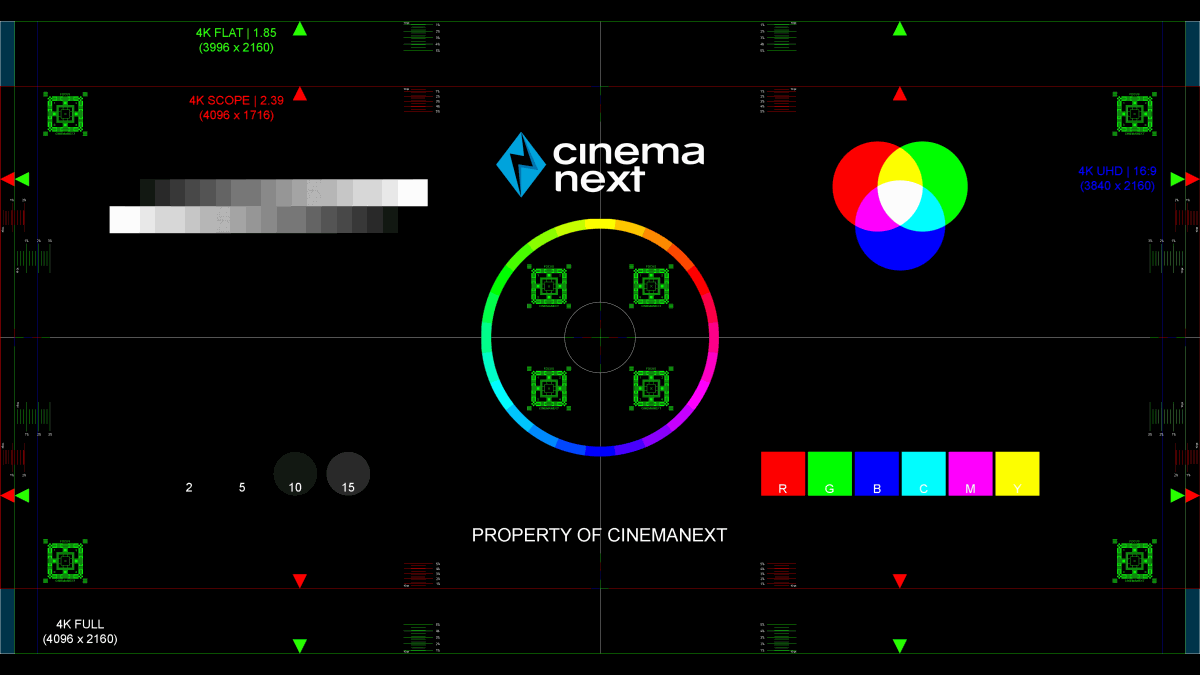
Are the framing rectangles highlighted by the arrows (green for Flat 1.85, red for Scope 2.39) within your screen boundaries?
- Yes, this confirms your framing is still accurate.
- No, then please take a picture and contact your local CinemaNext sales representative. You may require the help of one of our technicians to adjust it for you. We will assess the issue utilizing the picture we will receive from you.
Are the colors showing as spelled (R=Red, G=Green, B=Blue)?
- Yes, this confirms your colors are roughly accurate
- No, then please take a picture and contact your local CinemaNext sales representative. You may require the help of one of our technicians to adjust it for you. We will assess the issue utilizing the picture we will receive from you.
Are the focus patterns in the center and in the corner of the image (green squared box) in focus?
- Yes, this confirms your focus is still accurate
- No it is blurry, then please take a picture and contact your local CinemaNext sales representative. You may require the help of one of our technicians to adjust it for you. We will assess the issue utilizing the picture we will receive from you.
- At the center of the framing chart you’ll find Red, Green and Blue bars with a width of 1 pixel, aligned vertically and horizontally. Are these lines correctly aligned to each other?
- Yes, this confirms your convergence is still accurate
- No, then please take a picture and contact your CinemaNext local sales representative. You may require the help of one of our technicians to adjust it for you. We will assess the issue utilizing the picture we will receive from you.
!!! Don’t forget to test both Flat and Scope scenarios !!!
SOUND
Depending on your system play the following DCP:
- CNX_Channel-ID_TST_C_EN-XX_INT_51 for 5.1 Sound System
- CNX_Channel-ID_TST_C_EN-XX_INT_71 for 7.1 Sound System
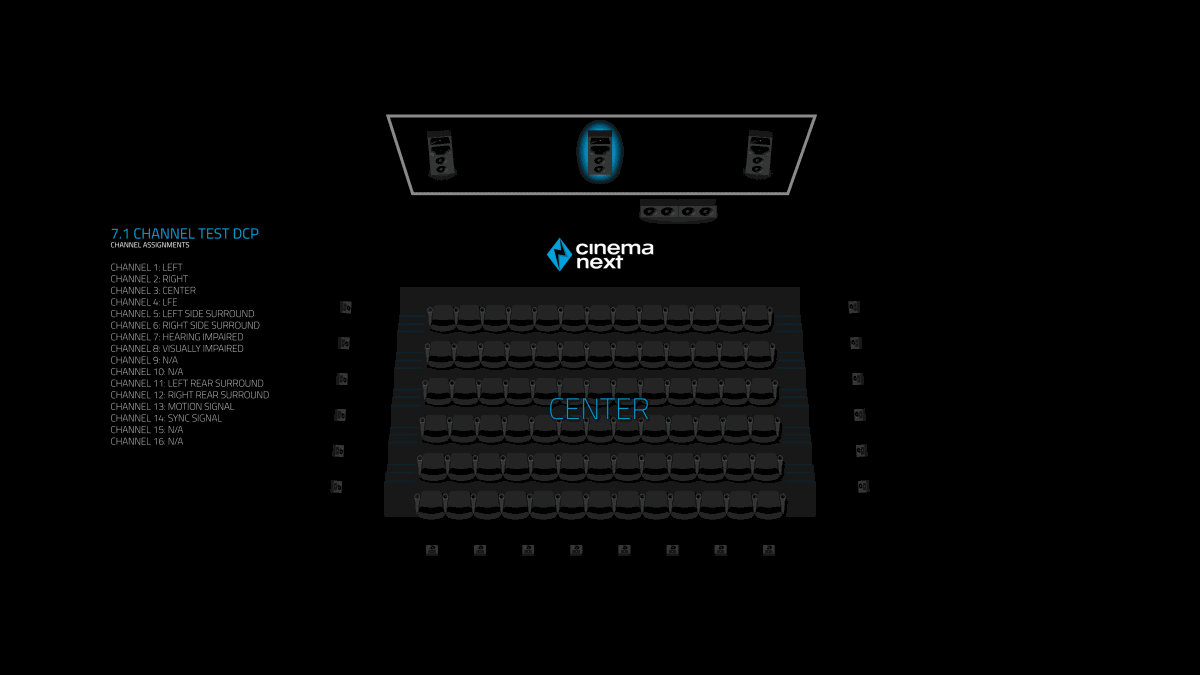
Is the commentary dialog sequentially coming out of the correct speaker as highlighted on screen?
- Yes, this confirms the integrity of your sound system and the fact that it is still operational (you may still require an in-depth calibration performed by one of our qualified technicians)
- No, please check that all the equipment is properly booted: Sound processor, crossover, amplifiers and you have selected the correct macro. If the issue remains, please contact CinemaNext technical support or your local sales representative. We will assist you remotely or locally.
SYNC
Play “CNX_SyncCheck_TST…”
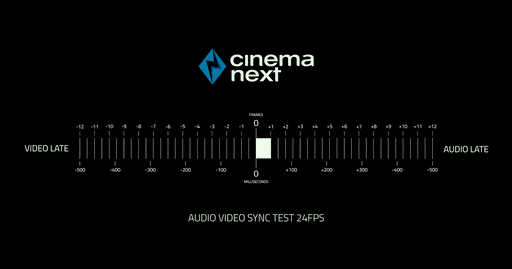
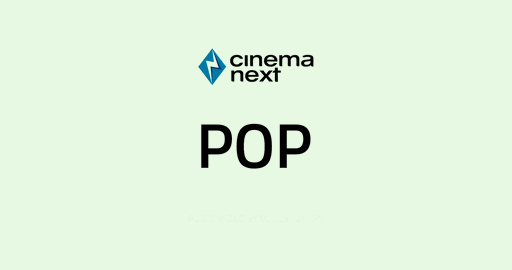
Are you seeing the here-above blank frame with the word POP written on it roughly (*) at the same time as you can hear the 1kHz tone?
- Yes, this confirms your Audio and Video are still in sync
- No, then please contact your local CinemaNext sales representative. You may require the help of one of our technicians to adjust it for you.
(*): for an accurate (to the frame) sound-image synchronization setting, please contact your CinemaNext sales representative to schedule an onsite cinema engineer intervention with suitable equipment.
CONCLUSION
If you’ve been successful at all the tests listed here-above, this should confirm your auditorium is operational for re-opening and hosting quality screenings without technical problems.
If certain tests have not been successful or if you have any concerns, please do not hesitate to contact CinemaNext technical support or your local sales representative. We will assist you remotely or locally.